INSTRUCTIONS

PICK YOUR GAMING PLATFORM FOR LOGIN INSTRUCTIONS:

MAC OS JAVA EDITION:

  1. Purchase and download Minecraft Java Edition from minecraft.net
  2. Install the latest update
  3. Login address: Access by invitation only. Contact us through Hotline or Discord.

WINDOWS JAVA EDITION:

  1. Purchase and download Minecraft Java Edition from minecraft.net
  2. Install the latest update
  3. Login address: Access by invitation only. Contact us through Hotline or Discord.

PLAYSTATION 4:

A Macintosh or Windows computer is required to facilitate tunneling

Click for Mac instructions Click for Windows instructions

MAC OS INSTRUCTIONS:

  1. Download the tunneling software, Phantom: Click here for direct download
  2. Open a Terminal and use the cd command to navigate to the folder Phantom downloaded to
    • For example, cd /Users/<user>/Downloads if Phantom resides there (Replace <user> with your username)
  3. Perform this command: chmod u+x ./phantom-macos
  4. Perform this command: ./phantom-macos -server <server address>:19132
    • Replace <server address> with the real address. Access by invitation only. Contact us through Hotline or Discord.
    • If the OS complains about security, click "Open Anyway" within the Security & Privacy pane in System Preferences
  5. If successful you'll see, "Proxy server listening!"
  6. Start Minecraft on your PS4
  7. Select Start and press R1 to switch to the Friends tab
  8. At the bottom of the list should be our server, “BorgmineJava”, listed under "LAN Games"
  9. Join and enjoy!
Note: This process of running Phantom is required every time you wish to play using your PS4.

WINDOWS INSTRUCTIONS:

  1. Download the tunneling software, Phantom: Click here for direct download
  2. Open a Command Prompt and use the cd command to navigate to the folder Phantom downloaded to
    • For example, cd C://Users/<user>/Downloads if Phantom resides there (Replace <user> with your username)
  3. Perform this command: ./phantom-windows -server <server address>:19132
    • Replace <server address> with the real address. Access by invitation only. Contact us through Hotline or Discord.
  4. If successful you'll see, "Proxy server listening!"
  5. Start Minecraft on your PS4
  6. Select Start and press R1 to switch to the Friends tab
  7. At the bottom of the list should be our server, “BorgmineJava”, listed under "LAN Games"
  8. Join and enjoy!
Note: This process of running Phantom is required every time you wish to play using your PS4. To make it faster, save the command from Step 3 in an otherwise empty text file with the .bat filename extension instead of .txt. That way, you need only double-click the batch file to create the tunnel.

NINTENDO SWITCH:

Instructions coming soon...

XBOX ONE:

A Macintosh or Windows computer is required to facilitate tunneling

Click for Mac instructions Click for Windows instructions

MAC OS INSTRUCTIONS:

  1. Download the tunneling software, Phantom: Click here for direct download
  2. Open a Terminal and use the cd command to navigate to the folder Phantom downloaded to
    • For example, cd /Users/<user>/Downloads if Phantom resides there (Replace <user> with your username)
  3. Perform this command: chmod u+x ./phantom-macos
  4. Perform this command: ./phantom-macos -server <server address>:19132
    • Replace <server address> with the real address. Access by invitation only. Contact us through Hotline or Discord.
    • If the OS complains about security, click "Open Anyway" within the Security & Privacy pane in System Preferences
  5. If successful you'll see, "Proxy server listening!"
  6. Start Minecraft on your Xbox One
  7. Select Start and press right to switch to the Friends tab
  8. At the bottom of the list should be our server, “BorgmineJava”, listed under "LAN Games"
  9. Join and enjoy!
Note: This process of running Phantom is required every time you wish to play using your Xbox One.

WINDOWS INSTRUCTIONS:

  1. Download the tunneling software, Phantom: Click here for direct download
  2. Open a Command Prompt and use the cd command to navigate to the folder Phantom downloaded to
    • For example, cd C://Users/<user>/Downloads if Phantom resides there (Replace <user> with your username)
  3. Perform this command: ./phantom-windows -server <server address>:19132
    • Replace <server address> with the real address. Access by invitation only. Contact us through Hotline or Discord.
  4. If successful you'll see, "Proxy server listening!"
  5. Start Minecraft on your Xbox One
  6. Select Start and press right to switch to the Friends tab
  7. At the bottom of the list should be our server, “BorgmineJava”, listed under "LAN Games"
  8. Join and enjoy!
Note: This process of running Phantom is required every time you wish to play using your Xbox One. To make it faster, save the command from Step 3 in an otherwise empty text file with the .bat filename extension instead of .txt. That way, you need only double-click the batch file to create the tunnel.

LIVE MAP

To see a live map of BorgMine, use the server address followed by port 8123

For example, http://serveraddress:8123

Mouse-over the pop-out drawer on the far right of the window to select between unique views of the world


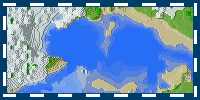
THE ATLAS

FIFTH AGE:
Coming 2020

FOURTH AGE:
Version 11.02 Nov 11, 2016 (9.4 MB)
Version 11.01 Oct 22, 2016 (9.4 MB)
Version 11.00 Sep 22, 2016 (9.4 MB)

THIRD AGE:
Version 10.00 Aug 24, 2013 (2.0 MB)

"NEW WORLD" (second age):
Version 9.06 Mar 20, 2013 (5.0 MB)
Version 9.05 Jan 29, 2013 (5.0 MB)
Version 9.04 Jan 13, 2013 (4.9 MB)
Version 9.03 Dec 29, 2012 (4.6 MB)
Version 9.02 Dec 10, 2012 (4.4 MB)
Version 9.01 Nov 19, 2012 (3.8 MB)
Version 9.00 Nov 16, 2012 (3.7 MB)

"OLD WORLD" (first age):
Version 8.00 Aug 21, 2012 (5.4 MB)
Version 7.02 Mar 7, 2012 (5.9 MB)
Version 7.01 Jan 30, 2012 (6.1 MB)
Version 7.00 Jan 3, 2012 (5.1 MB)
Version 6.03 Dec 7, 2011 (1.9 MB)
Version 6.02 Oct 11, 2011 (1.2 MB)
Version 6.01 Oct 6, 2011 (1.0 MB)
Version 6.00 Oct 4, 2011 (1.0 MB)
Version 5.00 Sep 16, 2011 (3.7 MB)
Version 4.01 Sep 6, 2011 (6.6 MB)
Version 4.00 Aug 11, 2011 (5.1 MB)
Version 3.10 Jul 11, 2011 (6.1 MB)
Version 3.09 May 24, 2011 (4.9 MB)
Version 3.08 May 16, 2011 (4.3 MB)
Version 3.07 May 11, 2011 (3.9 MB)
Version 3.06 May 2, 2011 (3.9 MB)
Version 3.05 Apr 21, 2011 (3.9 MB)
Version 3.04 Apr 13, 2011 (3.6 MB)
Version 3.03 Mar 30, 2011 (3.2 MB)
Version 3.02 Mar 24, 2011 (2.9 MB)
Version 3.01 Mar 10, 2011 (2.6 MB)
Version 3.00 Mar 7, 2011 (2.6 MB)
Version 2.01 Feb 14, 2011 (2.4 MB)
Version 1.03 Jan 19, 2011 (49 KB)
Version 1.02 Jan 11, 2011 (45 KB)
Version 1.01 Dec 15, 2010 (37 KB)
Version 1.00 Dec 14, 2010 (33 KB)


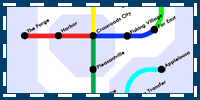
TRANSIT MAP

"OLD WORLD" (first age):
Version 1.01 Aug 21, 2012 (66 KB)
Version 1.00 Feb 29, 2012 (67 KB)


WEB LINKS

IMPORTANT AND RELATED WEBSITES: (All links open a new window)
http://www.minecraft.net/ - Official Minecraft WEBSITES
http://dump.tunhguod.com/ - Doughnut's "Dump" image repository
http://www.minecraftwiki.net/ - Minepedia, the Minecraft Wiki
http://www.minecraftwiki.net/wiki/Crafting - All crafting recipes

Have a suggestion/concern/argument or an idea of your own? Drop me a message. Email your thoughts to the Borgmine Cartographer, Rabbit, at this email address:
beyondaurora.com@gmail.com